On Friday, November 23, I participated in a session with Kathleen Gregory, an educational consultant with the B.C. Ministry of Education on assessment for learning. I was asked by our head of Program Support to attend the session to consider some ways that we can assess student learning using technological applications. I thoroughly enjoyed the session, as Kathleen had some great practical suggestions for assessing student learning in order to best meet student needs by tweaking our instructional practice. As I listened to Ms. Gregory, there were several ideas that popped into my head, which I'll share with you here:
Portfolios
Many teachers use portfolios to showcase student work and to have students self-assess their progress. Kathleen suggested including pictures of students completing projects along with the caption, "There is more to this picture than you can see. We'd like you to know that..." The students would then self-reflect on their learning during the project and write a reflection based on their thoughts. Immediately, I thought of an online/iPad app that I just discovered called Foto Babble. Sign up for a free account online at www.fotobabble.com. Students can take a picture while they are working on a collaborative or individual project, upload them to their online account, and then record an audio take on the learning that has occurred during the course of their work. Photos can then be shared with parents.
Goal Setting
In her presentation, Kathleen also discussed goal-setting as a way of having students assess their own progress and take ownership for their learning. She presented the idea of having students take an envelope with a goal, individual to the student, written on the outside. The students would collect work samples or reflective writings and place them inside the envelope as documentation of their progress toward meeting their own goals. Every once in a while, teachers call students aside for conferences to review what has been placed inside the envelopes. I started thinking that the online and iPad application called Evernote would be an excellent electronic tool for having students self-assess. The students could create a notebook, title it with the goal they have in mind, and as they progress, create individual notes to be placed inside the notebook. Students can take photos of the physical work they've created as they progress through a concept and attach an audio recording of what they have done to work towards that goal. Everything would be securely stored in their notebooks, allowing the student to work on several goals at once and organize their information in the appropriate notebooks.
Increased Student Participation
Teachers easily assess student understanding through oral discussion and participation in class, but for those students who don't readily offer their suggestions and input in class, there may be an app for that! Poll Everywhere and Go SoapBox are two online applications that teachers can use to increase student progress and get immediate feedback on concepts that may be confusing students. These online applications would be great in a BYOD (Bring Your Own Device) setting. Teachers can set up an account, pose questions, create quizzes, and solicit immediate feedback on student understanding. Students would use their smart phones or iPads to ask questions and respond to teacher-posed inquiries. Amazing engagement possibilities. Go SoapBox even offers security features that exclude profanity from responses.
Mind Maps
One of my favourite ideas that Kathleen presented had to do with mind maps. She suggested using mindmaps as a sort of KWL. At the start of the unit, the student would create a mindmap of what they know about a particular topic. As they progress through a unit, they can add subtopics and information onto the mindmap, changing the colour to reflect the new information and ideas that the student has learned in class. Using an application like Prezi or Popplet would be a create way of webbing student learning.
Self-Assessment
Another interesting self-assessment suggestion that Kathleen offered was the idea of having students video record themselves while presenting and then afterwards, completing a self-assessment checklist to determine whether or not they have met the criteria outlined at the start of creating the presentation. Kathleen stressed throughout her presentation that student-generated criteria is definitely a way to involve students in the assessment process, so determining what the criterion are for a good oral book report before the students present would be ideal. She suggested using a Flip Camera to record presentations, but the iPad video camera could also be used.
These are a few ways to help students assess their own learning. I'll add more in another post!
Monday, 26 November 2012

Wednesday, 21 November 2012
What's next?
I'm putting this out there for all my ISD colleagues. What kinds of resources would you like me to review in the next few weeks? I have plenty of topics that I'd like to discuss, but I want to hit the targets that you have in mind. Let me know what kinds of apps you'd like me to review or describe a need you or a student you are working with has that can be met with a technological application. You can post a comment by clicking the 'no comment' link (ironic) and typing in a request.
Monday, 19 November 2012
Free Apps
There are a few different ways of building up a great app library on your iOS device at low-to-no cost. I have an app called Apps Gone Free on my iPad and iPhone which sends me a daily notification usually about mid-day, about a list of apps that have gone free for one day or just a limited amount of time. It is great for finding interactive pop-up books, normally priced at $4.99, for free, and there are also a great variety of educational or productivity apps that appear for free as well. Apps Gone Free is a free app available in the app store.
Visiting websites like http://www.appymall.com/DailyAppDeals will also allow you to search for apps at a reduced, sale price. Search these places first before making a purchase!
Thursday, 15 November 2012
Is this app the one?
When I started this position, I wondered how I could wade through the plethora of apps to find the right one to meet a particular student's need. I feel pretty confident that I can choose an application that will assist a student complete a particular task in their school day, but it is often helpful to consult a rubric or other evaluative tool to determine if an app is the right choice. I've found a great blog by Sylvia Rosenthal Tolisano (who might become my technology guru) that has taken a renowned rubric created by Harry Walker, and adapted it into a visually appealing resource for teachers to use to evaluate the flexibility, usefulness, and overall quality of an app. This could be a good one for administrators and teachers looking to move from the traditional computer lab toward the mobile iPad lab.
http://langwitches.org/blog/?s=app+evaluation
 Update: I have recently found a really great alternative to Sylvia Rosenthal Tolisano's checklist which can be found here. Kathy Schrock has an excellent website that has some great suggestions on how to use technology in the classroom. You can peruse the wonderful content on her website at http://www.schrockguide.net/index.html.

Sites for Reviewing Apps
Here are a few sites that I've looked at when assessing whether or not to use an app with a particular student. You may find some of these useful when looking for an app to meet the need of a student:
http://bridgingapps.org/
http://www.therapyapp411.com/
http://www.freetech4teachers.com/
http://www.onlineclasses.org/2010/06/16/40-amazingly-educational-ipad-apps-for-kids/
http://www.iear.org/
http://appsforlearning.wikispaces.com/Educational+App+Review+Sites
http://www.commonsensemedia.org/
Alternatively, here are some apps to search for apps:
AppShopper (free)
Autism Apps (free)
Discovr Apps ($1.99)
Apps Gone Free (free)
http://bridgingapps.org/
http://www.therapyapp411.com/
http://www.freetech4teachers.com/
http://www.onlineclasses.org/2010/06/16/40-amazingly-educational-ipad-apps-for-kids/
http://www.iear.org/
http://appsforlearning.wikispaces.com/Educational+App+Review+Sites
http://www.commonsensemedia.org/
Alternatively, here are some apps to search for apps:
AppShopper (free)
Autism Apps (free)
Discovr Apps ($1.99)
Apps Gone Free (free)
Wednesday, 14 November 2012
ThingLink
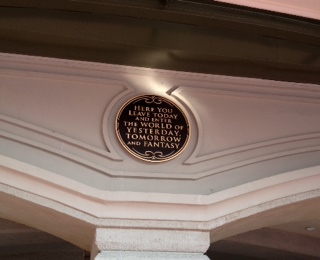 I just created this ThingLink this evening. I uploaded one of my favourite pictures from my trip to the Magical Kingdom this year and added links to a video, a poem, and a Walt Disney World planning website. This online application can be used by students to represent their understanding of a concept in any subject area. It's great for creating a customized, memorable visual representation of, well, anything~the sky's the limit!
Viewing Vids
There is a great video resource for instructors looking to find short videos on an endless variety of topics for the classroom. www.watchknowlearn.org is a compilation of videos from multiple sources, including YouTube and TeacherTube. Videos are easily searched and once you've selected a topic, you will be able to view the videos hosted on the watchknowlearn.com page or be redirected to the source website. You can customize your search to a particular audience and subject area~ there are 773 videos dealing with life skills alone! Could be a great resource if you haven't had the opportunity to travel to the Instructional Resources Unit and would like a video to help demonstrate a concept or process you are planning to teach.
Subscribe to:
Posts (Atom)